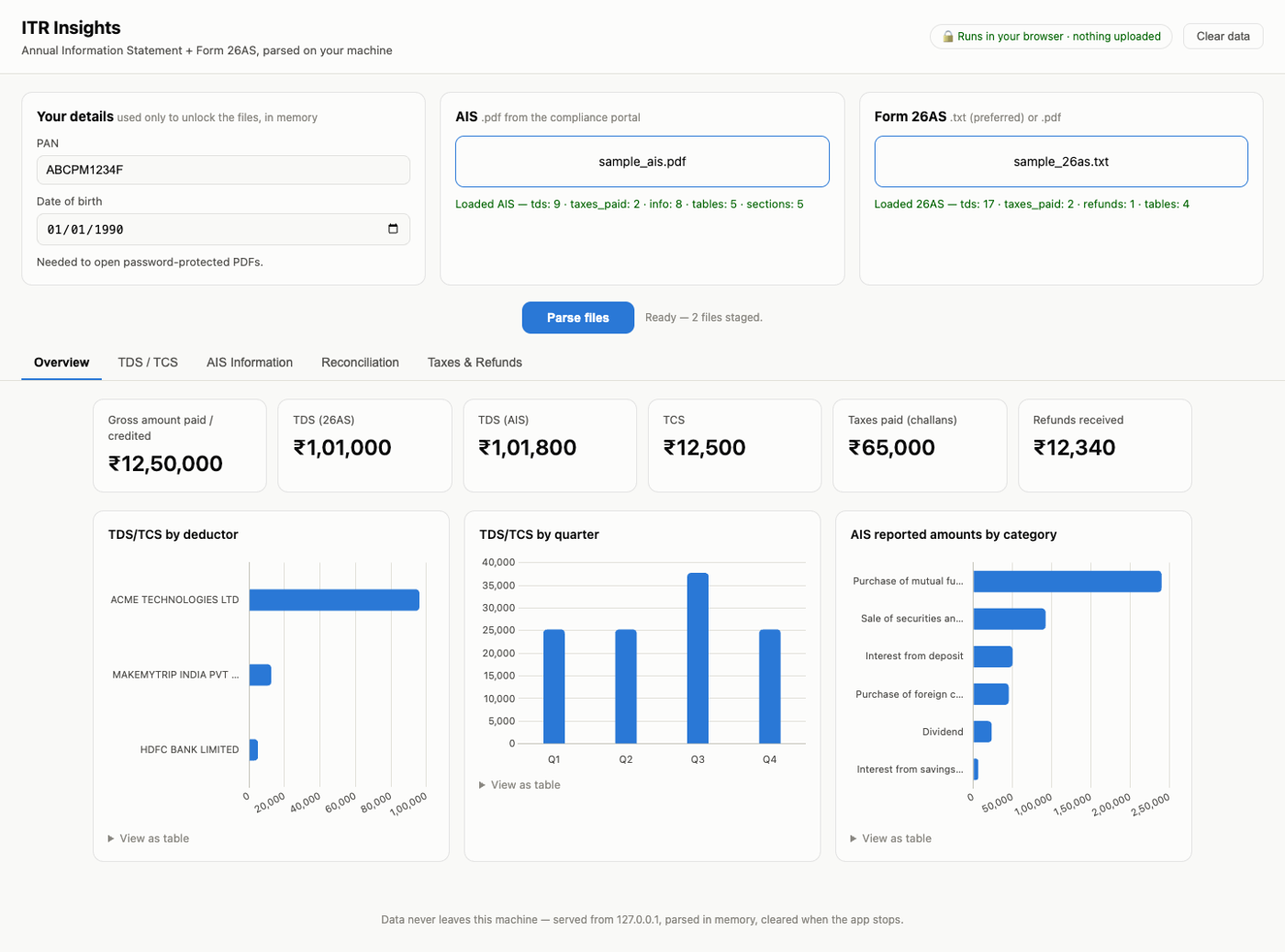
Every year the income-tax portal hands you two dense, password-locked statements and leaves you to eyeball them. This turns them into dashboards you can filter and sort — and reconciles the TDS in your AIS against your 26AS, so a missing or mismatched entry is obvious before you file.
Nothing is uploaded. The parsing runs inside your browser — this site has no server to send your files to. Here's how you can check that.
Short version: nowhere. Your PDF, your PAN and your date of birth are read by Python compiled to WebAssembly, running in the same tab you're reading this in. They are held in memory, never written to disk, and gone the moment you close the tab.
Opening the tool downloads a Python runtime (~23 MB, cached afterwards) and the parsers. That traffic goes one way.
There is no upload endpoint, no API key, no analytics. A Content-Security-Policy of connect-src 'self' means the page is not permitted to talk to any other host, even by accident.
Open DevTools → Network, then parse a file. You'll see no request leave. Or load the page, turn off your WiFi, and parse anyway — it still works.
Because of one thing, and it's worth being straight about it: using a hosted site means trusting it to serve honest code every single visit. Today's build parses your files locally. You are taking my word that tomorrow's does too. That's a supply-chain risk, and no privacy policy can talk you out of it.
Running it yourself removes that. The code is pinned on your machine, you can read it, and it works with the network cable pulled out. For a document that contains your PAN, your salary and every bank you hold an account with, that's a reasonable thing to want.
| Hosted here | Run locally | |
|---|---|---|
| Are your tax files uploaded anywhere? | No | No |
| Where does parsing happen? | Your browser (WASM) | Your browser, or your own Python |
| Works with the internet off? | After the first load | Always |
| Do you have to trust the host? | Yes — to serve honest code each visit | No — the code is pinned on your machine |
| Can you read the code that ran? | View source | It's on your disk |
Either way, this is a read-only tool. It cannot file anything, and it never asks for a portal password or an OTP.
One command. No clone, no repo, nothing to configure — it starts on your own
127.0.0.1 and opens your browser.
pipx run itr-helper
Or pip install itr-helper and then just itr-helper. This is the real thing:
the parsers run as native Python, so there's no WebAssembly runtime to download.
npx itr-helperSame app, no Python needed — it serves the browser build from your own machine. Handy if you don't have Python around.
Either way it binds to 127.0.0.1, so nothing else on your network can reach it. Stop it with
Ctrl+C and every trace of your documents goes with the process — nothing is
written to disk.
If you'd rather read the code first, or hack on the parsers:
git clone https://github.com/sivab193/itr-helper
cd itr-helper
python3 -m venv .venv && source .venv/bin/activate
pip install -e .
itr-helper # → http://127.0.0.1:5001Not to identify you — the portal locks these files with a password derived from exactly those two things (AIS uses your PAN in lowercase followed by your DOB as ddmmyyyy; 26AS uses the DOB alone). The tool derives the password so you don't have to remember the rule. Both values stay in memory.
The AIS PDF is decrypted and its tables extracted; the 26AS .txt is a caret-delimited TRACES export, read part by part. This is ordinary Python — pypdf, pdfplumber — compiled to WebAssembly so it can run in a browser tab.
TDS and TCS land in one sortable table you can slice by deductor, TAN, section, nature of payment, quarter or date range. Then the two documents are compared against each other.
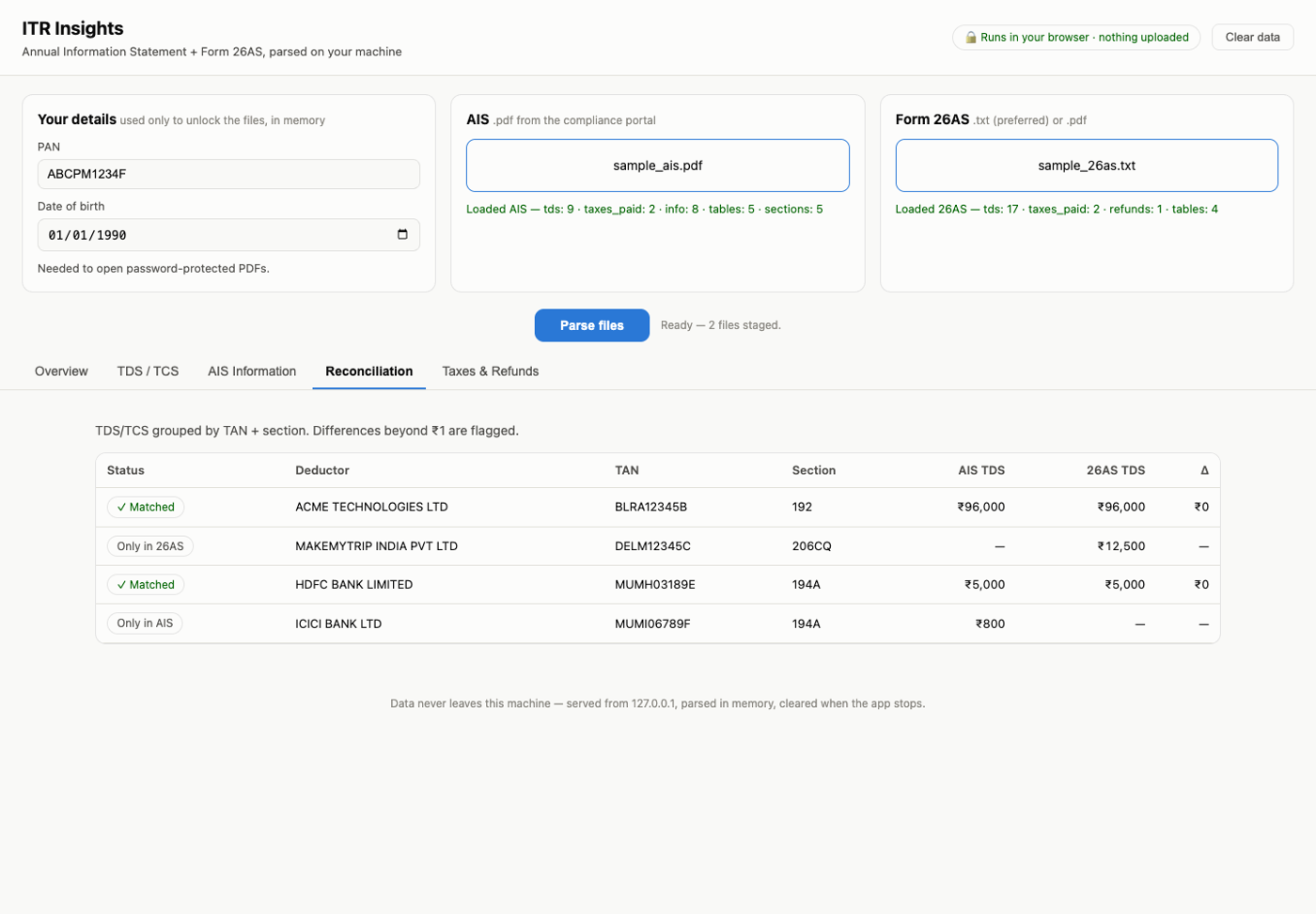
AIS and 26AS are supposed to agree. When they don't, that's the thing you need to see before you file. Entries are grouped by TAN and section code and matched, so each row comes back as matched, amount mismatch, only in AIS or only in 26AS.
| Document | Where to get it | Format |
|---|---|---|
| AIS | Income-tax portal → AIS → Download → PDF | .pdf |
| Form 26AS | Portal → e-File → Income Tax Returns → View Form 26AS → TRACES → Export | .txt preferred, .pdf works |
Prefer the 26AS .txt: it's caret-delimited, so every row is unambiguous. PDF table
extraction is a best-effort guess at where the columns were, and the tool says so when it falls back to it.
You don't have to hand it your real statements to try it. The repo generates realistic synthetic ones:
python samples/make_samples.py # → a fake AIS PDF + 26AS txt, PAN ABCPM1234F, DOB 01-01-1990No. They never leave your browser. I have no server, no database and no logs — there is nowhere for them to arrive.
It ships a whole Python runtime (~23 MB) so the parsing can happen on your side instead of mine. It's cached after the first visit. Sending your PDF to a server would be a much lighter page and a much worse trade.
Use the PDF. The portal's JSON export is encrypted in a way that hasn't been reliable to decrypt, so support for it was removed rather than left half-working.
Check the Raw extracted tables panel on the AIS tab — it shows exactly what the parser saw. If a table came out wrong, that's a bug worth reporting. Please don't attach your real statement; a description of the table's shape is enough.
No. It reads two documents and adds up the numbers in them. Verify anything you rely on against the portal, and talk to a professional about what it means.